 noteboard
Give the prompt enough context to work with
Write a short account of the situation before asking for ideas. Include who the work is for, what is difficult now, what you already know, and the limits that matter. You don't need a lengthy document. A few concrete notes give you something to judge the response against.
For example: “We run a small ceramics studio. Beginners ask whether they need experience before booking. One host runs each session. We can update the booking page and make one short video this week.” That is a more useful starting point than a request for creative marketing ideas with no context.
In Noteboard.ai, select the cards relevant to the question and preview the context before asking. Keep observations and guesses separate. The prompts below are original examples; you can use them individually rather than running through all twelve.
Use a prompt on your board
Add your project observations and constraints as separate notes, then select the notes relevant to this round. Choose an existing AI action that fits the task, such as Expand for alternatives or Challenge for assumptions.
Adapt the prompt into a short instruction in the Anything to focus on? field. Keep the background in the selected notes and use the instruction to say what to explore. For example: “Suggest three welcome approaches one host can try. Explain the assumption behind each.”
Preview the context, check that the right notes are included, and send the request. Review the suggestions against your project, edit them, and keep only what you want to develop. If you work with an external assistant, the existing assistant connection guide explains how to connect it to Noteboard.ai.
Prompts 1–3: understand the problem
Use these brainstorming questions when the topic is broad, the notes conflict, or you're unsure what the session is supposed to decide. They help you examine the starting material before asking for solutions.
1. Turn the topic into workable questions
Use this when a subject such as “improve onboarding” is too broad to act on.
We want to explore [topic] for [audience]. Here is what happens today: [observations]. Suggest three specific questions we could work on in this session. Explain what decision each question would help us make. Keep the questions within [time, budget, or scope].
Example follow-up: “The question about the first visit fits our notes. Narrow it to something we can investigate at the next workshop.”
2. Separate observations from guesses
Use this when a possible explanation is starting to sound like an established fact.
Read these notes: [notes]. Separate what we observed, what we are assuming, and what remains unanswered. Keep the original details attached to each point. If a note is ambiguous, explain what we would need to clarify rather than completing it for us.
Example follow-up: “We observed repeated questions about experience. What else could explain those questions besides a lack of confidence?”
3. Choose a manageable boundary
Use this when the session keeps expanding into a much larger project.
Our goal is [goal], but we have [time, people, and budget]. Help us define a question we could reasonably explore within those limits. List what belongs in this session, what can wait, and any dependency that could stop us from making progress.
Example follow-up: “Keep the session focused on the booking page. Save changes to the workshop itself for a separate discussion.”
Prompts 4–6: explore different approaches
Use these when the problem is clear enough to work on. Ask for approaches that differ in how they address it. Several differently worded versions of the same idea give you less to compare.
4. Ask for distinct alternatives
Use this when you need a few approaches you can compare before producing a detailed plan.
Suggest three different ways to help [audience] achieve [goal], given [constraints]. For each approach, explain the main idea, what we would need to do, and the assumption behind it. Make the approaches differ in how they solve the problem, not just in their wording.
Example follow-up: “These all rely on a video. Give us an approach using clearer written information and another using a conversation with the host.”
5. Look from another person's position
Use this when the team's own familiarity with the work may hide a beginner's questions.
Consider [situation] from the position of [first-time user], [experienced user], and [person delivering the service]. Suggest what each might need to know or find difficult. Mark these as possibilities to investigate. Do not invent interview findings or present their imagined views as evidence.
Example follow-up: “Turn the possible first-time visitor concerns into questions we can ask a recent attendee.”
6. Combine two useful ideas
Use this when two suggestions each solve part of the problem.
Here are two ideas: [idea A] and [idea B]. Explain what each contributes to [goal]. Suggest a combination that preserves those useful parts within [constraints]. Also describe a simpler version in case the combined approach requires too much work.
Example follow-up: “Combine the host's welcome with the short demonstration, but keep it something one person can run in five minutes.”
Prompts 7–9: check the idea before committing
An idea can sound convincing while depending on information you don't have. Use these prompts to examine how it might fail, what it assumes, and whether a smaller version would teach you enough.
7. Reverse the goal
Use this when the team is repeating familiar positive suggestions.
If we wanted [experience] to be confusing or frustrating for [audience], what would we do? List specific situations. Choose three that relate to our notes and turn them into practical questions or changes we could consider. Keep the result relevant to [scope].
Example follow-up: “For the confusing arrival instructions, suggest what the confirmation email should explain.”
8. Find the assumption with the weakest support
Use this before spending time building a feature or producing a campaign around a guess.
For [idea] to help [audience], what would have to be true? Compare those assumptions with these observations: [notes]. Identify the important assumption with the least support and explain what information would help us examine it. Keep missing information explicit.
Example follow-up: “We don't know whether people want advice or just clearer descriptions. How could we explore that before building a recommendation form?”
9. Reduce the work to a useful first version
Use this when a promising idea has collected too many extra parts.
We are considering [idea] to achieve [benefit]. Suggest the smallest version we could try with [resources]. Explain what it keeps, what it leaves for later, and what we could learn from it. Do not assume we need an app or automation if a manual version would answer the question.
Example follow-up: “Keep the host's recommendation manual for the first trial. What information would the short form need?”
Prompts 10–12: compare options and plan a test
Use these after you've gathered a few possibilities. Choose the criteria yourself and keep the reasons visible. A table of confident-looking scores is only helpful if the information behind it is sound.
10. Compare the options using your criteria
Use this when the discussion is drifting toward whichever idea has the best presentation.
Compare [options] using these criteria: [audience need], [effort], and [uncertainty]. Explain the tradeoffs using only the information in [notes]. Identify where the comparison depends on a guess. Suggest what we should clarify before choosing.
Example follow-up: “We have one afternoon for production. Reconsider the options with that limit and explain what changes.”
11. Design a small experiment
Use this when you know which assumption you need to examine.
We want to test whether [assumption]. Suggest a small, inexpensive experiment with [resources]. Describe what we would show or do, who we should learn from, what we would observe, and what result might change our decision. Explain what this test would still leave unanswered.
Example follow-up: “Write three neutral questions we could ask after someone reads the draft booking page.”
12. Write a concrete action for the chosen approach
Use this when the team has chosen an approach but the work is still described vaguely.
We have chosen [approach] because [reason]. Turn it into one concrete action we can start. Include the question it addresses, what completion looks like, and who should review the result. Leave the owner or date open if that information is not in our notes.
Example follow-up: “The organizer will prepare the draft. Write a review checklist for the host without inventing a publication date.”
Example: follow a suggestion with a more specific question
Suppose the studio uses prompt 4 and receives suggestions for a welcome video, a revised booking page, and a short conversation with the host. These are illustrative possibilities, not results from a customer study or a recorded AI session.
The team decides a page revision fits this week's capacity. A useful follow-up is: “Using the visitor questions in these notes, list what the page should explain. Keep the existing workshop details and mark any missing information for the host.” The follow-up carries the actual decision into the next request.
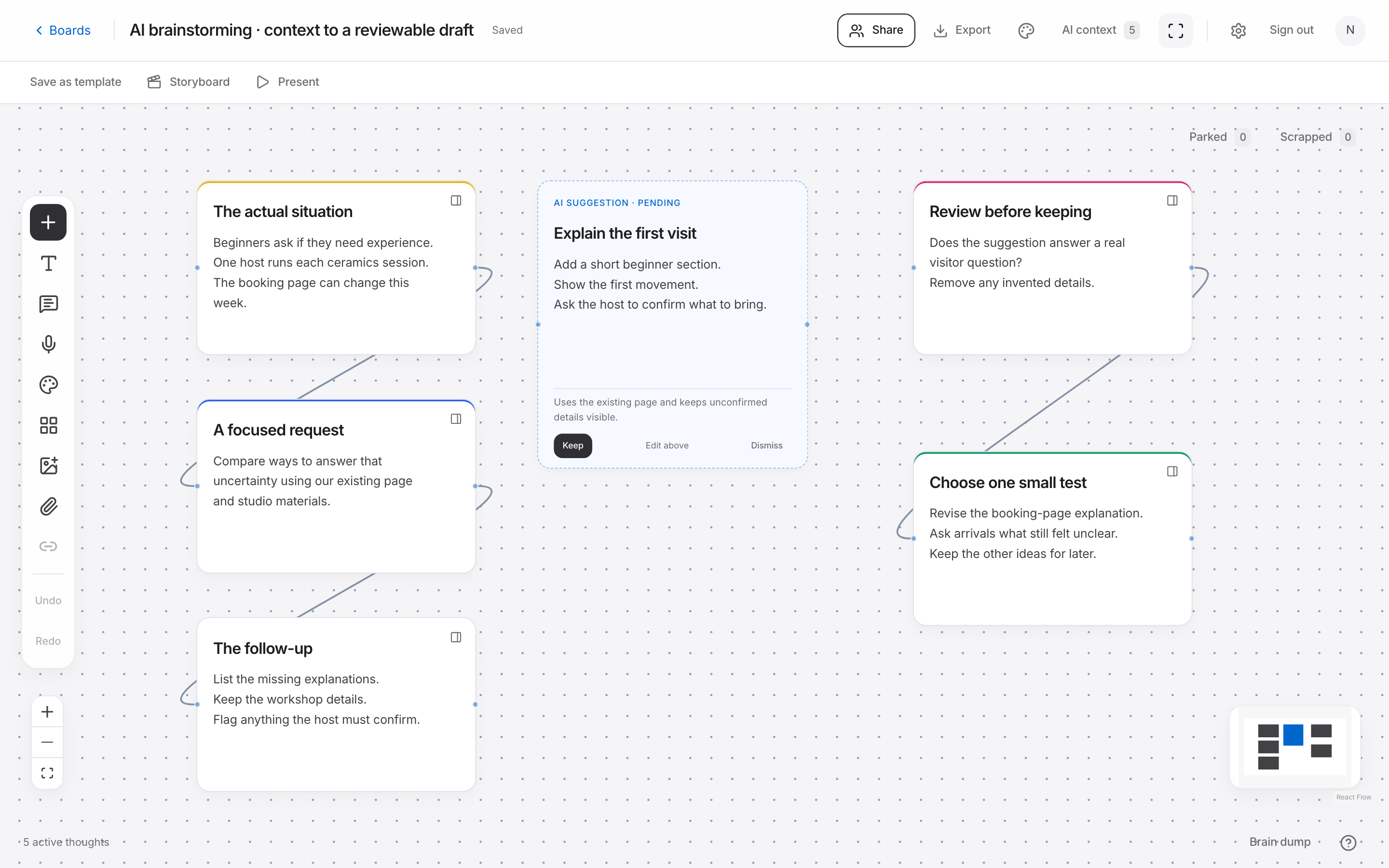
Example: from context to a reviewable draft
- Context
- Beginners ask about experience level. The team can revise the booking page this week.
- Request
- Compare ways to answer that uncertainty using the existing page and available studio materials.
- Follow-up
- Draft the missing practical explanations and flag the details the host needs to confirm.
Edit and check the response before using it
Read the result against the question you asked. Remove vague suggestions, check any factual claims, and correct details that conflict with your notes. If the AI has filled in a budget, audience preference, or deadline you never supplied, remove it or turn it into a question for the team.
Keep the useful suggestions and write down why you chose them. In Noteboard.ai, edit, keep, or dismiss the suggestions before developing the board further. You can then return to the observations and the decision when you plan the next session.
Choose a prompt for the question you have now. Add your observations and limits, ask a focused follow-up, and review the response before acting on it.