Skip to content

A moodboard maker for your visual ideas

Collect images, add named color swatches, and arrange your references into a visual direction. Keep notes beside each reference so collaborators can understand what you want to carry into the design.

Start your moodboard
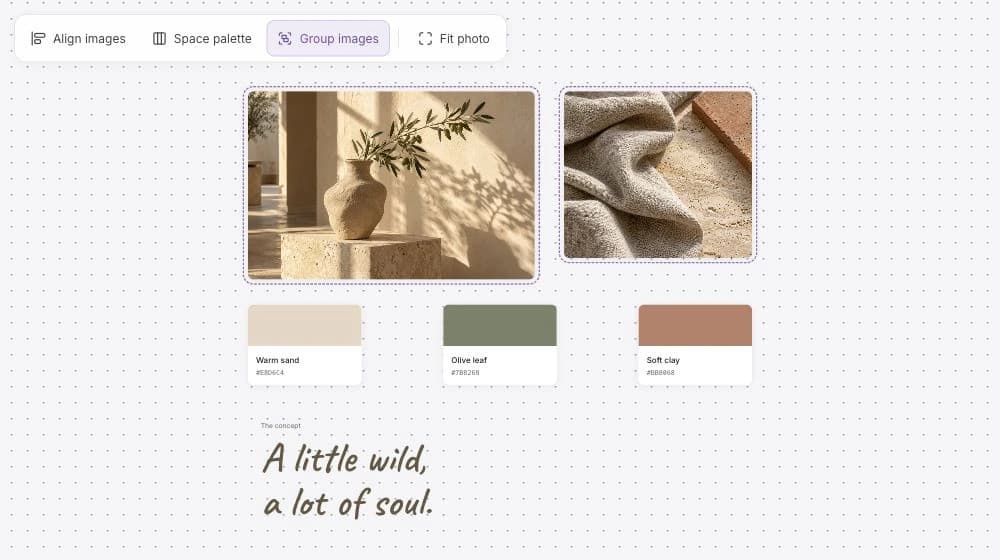
The Noteboard.ai moodboard combines studio photographs, three named color swatches, and a handwritten concept.

Build a visual direction people can understand, discuss, and carry into the design work.

Collect the references
Bring images, color swatches, and written ideas into one composition.
Work with the details
Crop an image, align a group, and adjust the space between references.
Explain the choices
Add concept text and notes so the board communicates more than a collection of pictures.

See a moodboard come together

The example uses image cards, color swatches, and concept text. Watch the composition change or try the arrangement controls.

Collect images with a reason to keep them

Upload, drop, or paste the images that help explain the direction. A reference might be useful for its color, texture, composition, or the feeling it creates. Add a short note about that choice while it is easy to remember.

An online mood board can hold photographs, illustrations, typography references, and your own concept text. Add named color swatches beside the images so the palette is available for discussion too. You can keep written planning notes nearby without making them part of the final visual composition.

Arrange the collection until the direction makes sense

Use Fit to show an image in full or Crop to focus on the useful part. Group related cards so they can move together, align their edges, and distribute the space between them. The arrangement can make the strongest reference clear before someone reads the notes.

Try a few combinations and remove images that pull the board toward a different idea. A playful illustration and a restrained palette might work together, for example, while an unrelated formal photograph makes the overall direction harder to explain.

Keep a short statement beside the composition. “Bold color and hand-painted texture” gives a collaborator something to discuss. You can revise the wording and the references together as you agree on the direction.

Review the visual idea with the people making it

Share the board with a collaborator or export the composition as PNG or a single-page PDF. Ask how the choices fit the audience and the work you are planning. Keep the feedback beside the relevant group so it is easy to understand which choice it concerns.

A mood board maker helps you compare and communicate the direction before the final artwork is made. Use the agreed images, palette, and written rules as a reference in the design tool where you create the finished piece.

Example: a playful illustrated campaign direction

The illustrated preview uses a cat riding a blue pencil, with orange, blue, and a warm paper color. It could be a reference for a fictional stationery campaign where the team wants the imagery to feel playful and handmade.

The useful part of the board is the explanation of what to carry forward. The final campaign can develop its own artwork while retaining the agreed color relationships, texture, and tone.

Illustration
A simple character and visible brush texture suggest a playful, handmade approach.
Palette
Orange and blue lead, with a quiet paper background around them.
Direction note
Keep the imagery expressive and the surrounding layout simple enough to let it lead.
This is an illustrative design example using the generated artwork shown in the preview.

Frequently asked questions

Can I combine images, color swatches, and text?

Yes. Arrange image cards, named swatches, concept text, and written notes on the same board. Keep the explanation beside the reference it describes.

Does cropping change my original image?

Fit and Crop change how the image is framed on the board. Use them to compare compositions while keeping the original image available.

Can I share a finished moodboard outside Noteboard.ai?

Yes. Export the whole board or a selected composition as PNG or a single-page PDF. You can also share the editable board for a review that continues in the workspace.

Create a moodboard for your project

Add your images, color references, and design notes to a board, then arrange the composition.