 noteboard
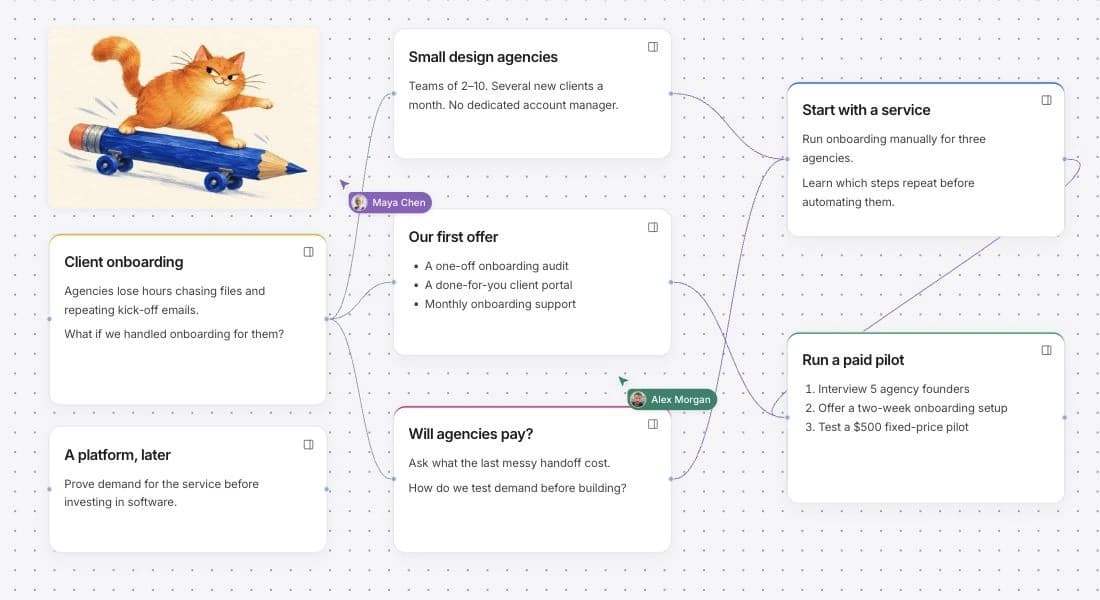
Set up a shared brainstorming board
Write the question your team needs to explore, then add the observations, references, and constraints that affect it. Keep observations and assumptions in separate notes so everyone can see what is known and what still needs checking.
Invite collaborators as editors when they need to add notes, edit the board, or take part in discussions. Viewers can read the board and its discussions. Everyone signs in to join, and the owner manages invitations and access.
Add observations and compare possible solutions
Give each observation or possible solution its own note. Connect an idea to the problem it addresses, and keep supporting references nearby. Team members can contribute during a shared session or return to the board at different times.
Use comments to ask questions and discuss a card or a point on the canvas. Record agreed decisions in board notes so they remain part of the working explanation.
If a discussion contains information you want AI to use, add the relevant point to a note first. Comments remain separate from ordinary board AI context.
Explore selected notes with AI
Select the problem, relevant observations, and constraints. Preview the context, then use Expand to explore alternatives or Challenge to examine an assumption.
Review and edit the suggestions before keeping them. Pending proposals remain private to the person who requested them. Kept suggestions join the shared board, where collaborators can develop them.
Compare the suggestions with your observations and practical limits. Record which direction the team wants to investigate and what information could change that decision.
Example: compare three ways to improve client onboarding
Imagine a founder, designer, and developer exploring how to help small agencies collect client files before kickoff. The following is a fictional planning example. It shows how a team can organize a discussion; it does not report customer findings or a successful business test.
| Stage | Example board content |
|---|---|
| Problem | How could an agency collect the right client files before kickoff? |
| Starting observations | Files arrive across several email threads. Missing items are discovered after work is due to begin. |
| Constraints | The team has two weeks to prepare a manual trial using existing tools. |
| Alternatives | A clearer kickoff checklist, a guided submission form, or a managed file-collection service. |
| Assumptions | A checklist will reduce missing files. A form will need less explanation. Agencies would pay someone to manage collection. |
| Next experiment | Ask an agency to try a revised checklist at its next kickoff. Record what remains missing and which instructions need explaining. |
The founder records the customer questions, the designer checks the clarity of the checklist, and the developer notes what a form would require. The team selects the relevant notes before asking AI for alternatives or a challenge to its assumptions.
The shared decision is to try the checklist first. The form and managed service remain alternatives to reconsider after the trial.
Example: review a workshop brief together
Imagine a workshop host and designer reviewing a campaign board. The host checks the practical details while the designer compares the message and the references. The board gives both people a shared place to make the decision clear.
The names and brief in the visual are illustrative. They show how two roles can use the same material without implying a customer testimonial or a particular project result.
A shared review with a clear purpose
- Host
- Check the activity, date, capacity, and what a beginner needs to know.
- Designer
- Review whether the images and message explain the experience accurately.
- Shared decision
- Keep the chosen direction and the unanswered practical question beside the brief.