 noteboard
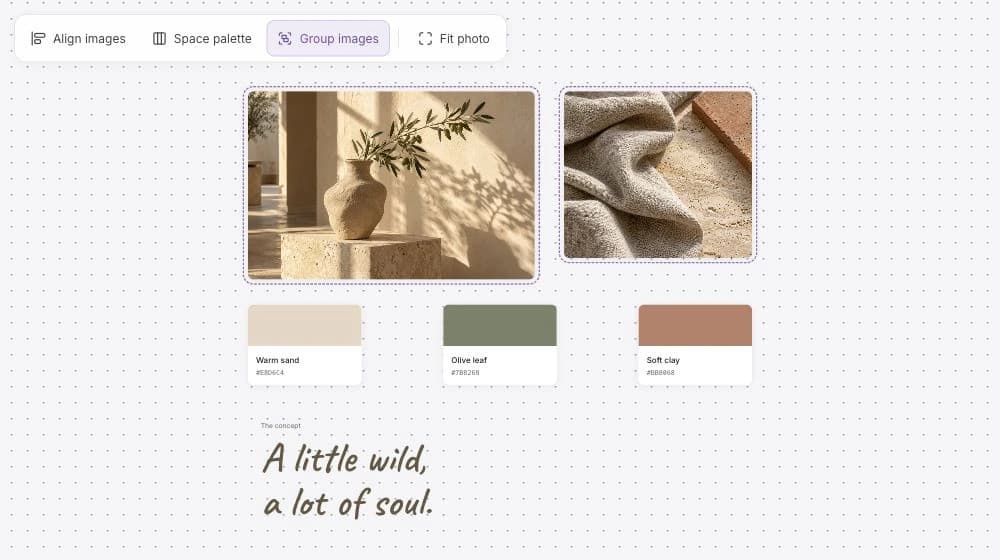
Export the whole board or selected cards
A board may hold several possibilities while a review concerns only one. Select the cards that explain the chosen direction, or export the whole active board when the wider context matters. The output uses the saved composition bounds, rather than just the area currently visible in the browser.
For a design review, you might include the images, palette, and direction statement. For a planning conversation, choose the central idea, its supporting notes, and the unresolved question. A focused snapshot lets the recipient see what you want to discuss without needing to navigate the rest of the board.
Keep the work together in the snapshot
The export retains the arrangement of saved notes, images, swatches, concept text, and connections. Editing controls, live cursors, and pending AI proposals stay outside the output so the snapshot reflects the work you have chosen to keep.
Embedded webpages, PDFs, video, and audio appear as labeled references in the exported composition. Keep the original board when the recipient needs to open or play the source material. That makes the image or PDF a useful overview while the board remains the place for deeper review.
Before exporting, check that the saved wording and layout say what you mean. If the snapshot needs an explanation, add the note to the composition so it travels with the work.
Choose the export format for your review
Use PNG when you want an image to place in a document, presentation, or message. Use a single-page board PDF for a document-based review. Use Export storyboard PDF for a saved shot sequence. Both PDF exports contain fixed images of the content, rather than editable board objects, searchable text, or vector artwork.
Keep the editable board for the discussion that follows. A mind map export can show the current decision clearly while the original still holds the references, alternative ideas, and space for another version. Update the board and export a fresh snapshot when the direction changes.
| Format | What you receive |
|---|---|
| PNG | An image of the saved composition for the whole board or selected cards. |
| Board PDF | A single-page PDF containing an image of the saved board composition or selection. |
| Storyboard PDF | Shot pages in saved sequence order, with production notes and continuation pages when needed. |
Example: share one campaign direction for review
Imagine a board with two possible campaign directions and a group of research notes. The team has chosen one direction to discuss with a reviewer. A selected export can keep that conversation focused on the chosen composition.
This example is about choosing the scope of the snapshot. The person exporting still decides which saved cards belong in the selection and which context needs to travel with them.
A focused board snapshot
- Include
- The chosen illustration, its palette, the central message, and a note explaining the direction.
- Keep on the working board
- Alternative ideas, source files to open, and questions for a later round.
- Choose the format
- PNG for another document or presentation; a single-page PDF for a document-based review.