 noteboard
Record or upload a voice note
Use your microphone to record a brain dump or upload an existing audio file. Speak about the idea in the order it comes to you. You can include context, possible approaches, and open questions without dictating a finished outline.
For example, you might talk through an agency-onboarding idea: what clients keep asking for, which part you could handle manually, and what you still need to learn. The recording gives those details a place before you decide how to organize them.
Review the transcript before generating a map
Read the transcript and correct anything that changes the meaning. Names, numbers, unfamiliar terms, and missing words deserve a closer look. You can add the context a quick spoken reference left out, such as which customer or deadline you meant.
This review gives you a chance to recognize separate ideas too. A possible service, a question about pricing, and an idea for a later product can remain distinct. They do not all need to become one plan just because they appeared in the same recording.
Keep the reviewed text as the starting material. When a generated note later feels too broad or seems to miss an important condition, you can compare it with the words you actually supplied.
Turn the transcript into a working board
AI organizes the reviewed material into a new board of connected notes. Move a branch, rewrite a title, or add a relationship that the first map did not capture. Your reviewed transcript stays alongside the ideas as a reference.
You can keep developing the map manually or select a few notes for another AI request. Ask for alternatives to one proposed offer, for example, while keeping a separate software idea parked for later. The useful result is a board you can work with after the recording ends.
Example: turn a spoken service idea into a few clear notes
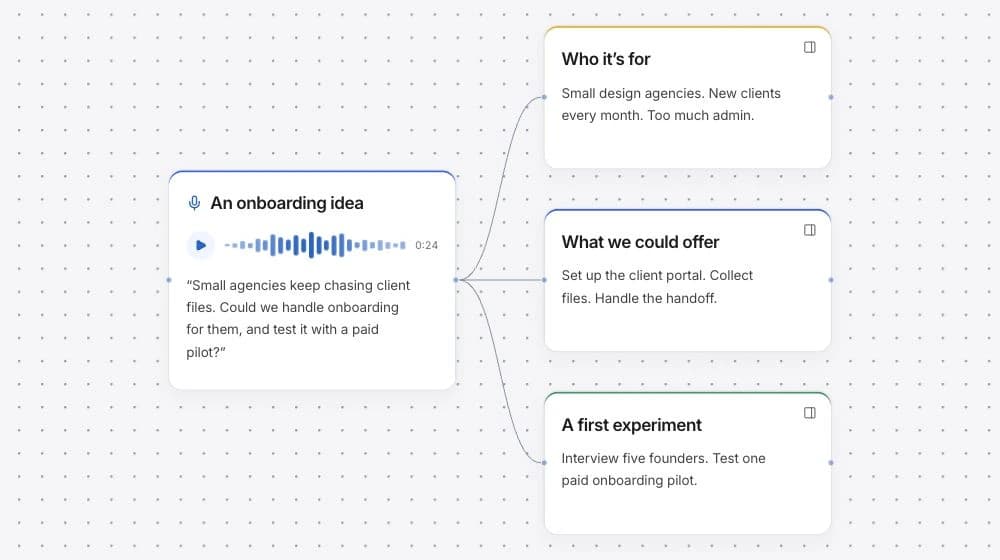
Imagine a voice note about helping small agencies with onboarding. The speaker moves between the customer, the offer, and a possible future product. The map can separate those subjects so each can be considered on its own.
This example shows the kind of organization you can review and edit. It does not imply that every recording produces the same structure or that an idea has already been tested.
From a rough voice note
Small agencies keep chasing client files. Maybe we could handle the setup, learn what repeats, and think about software later.
- Audience
- Small agencies with recurring client handoffs and limited account-management time.
- Possible offer
- Handle the first onboarding setup manually and learn which steps repeat.
- Question to explore
- Which part of the handoff would a founder pay someone else to handle?