 noteboard
1. Fill the first space with whatever is on your mind
Start in “Everything on my mind.” Write reminders, questions, possible ideas, and unfinished jobs in the order they arrive. Fragments are fine. You don't need to decide whether something is important before it earns a place on the page.
If the space feels too open, choose a topic such as a project, the coming week, or a meeting you're preparing for. Set aside a few uninterrupted minutes. Keep writing until you've captured the main thoughts, then read them once before moving to the next field.
You can also speak the first version. Record a voice note, review the transcript for names and missing details, and use that text to fill the worksheet. Keep the capture somewhere you can return to if a short note later needs more explanation.
2. Give related thoughts a group and separate the questions
In “The themes I notice,” write a few labels for thoughts that belong together. They might be workshop planning, writing, home jobs, or ideas for a later project. Keep the labels useful to you rather than trying to design a complete filing system.
Move unresolved details to “Questions to resolve.” “Ask about the venue date” belongs here if the answer blocks the invitation. A question can deserve attention before a larger task because answering it changes what the task needs to be.
Use “Ideas for later” for things you want to keep without taking on now. You can be interested in a new logo and still decide that this week's workshop doesn't need one. Capturing the idea gives it a place without making it a commitment.
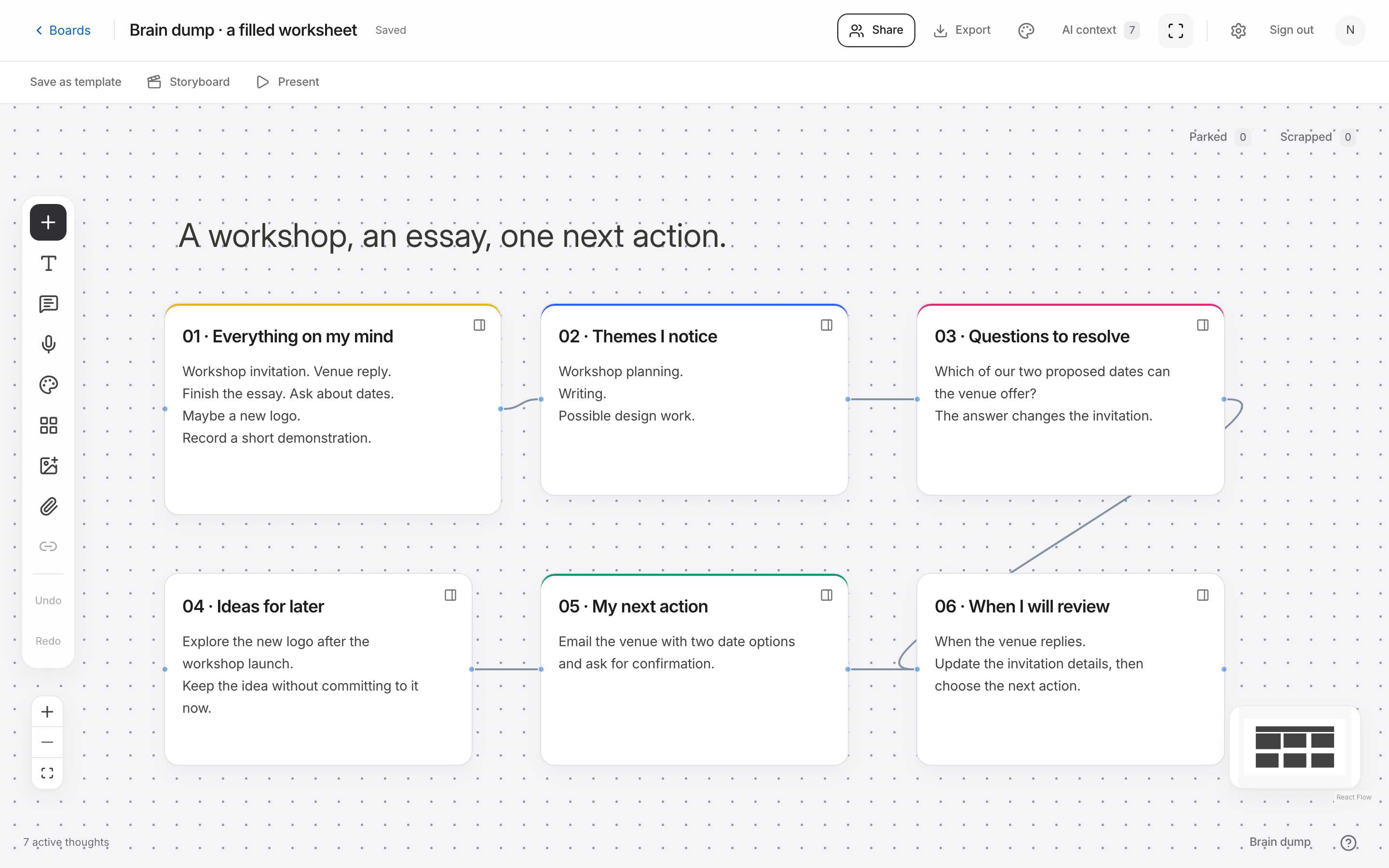
A filled brain dump template example
Here is a fictional organizer preparing a workshop while finishing an essay. The original capture mixes a deadline question, several tasks, and a possible design project. The worksheet separates them before choosing an action.
Notice that the next action responds to something in the capture. It doesn't turn every item into a deadline or assume the organizer can complete the whole list today.
Example rough capture
Need the workshop invitation, venue still hasn't replied, finish the essay, ask about dates, maybe make a new logo, record a short demonstration.
- What needs an answer
- The venue needs to confirm which date is available before the invitation can be finalized.
- What can be started separately
- The essay outline can begin with three headings during the next writing session.
- What can wait
- A new logo is an idea to reconsider after the workshop launch.
| Template field | Filled example |
|---|---|
| Everything on my mind | Invitation, venue reply, essay outline, new logo idea, and demonstration video |
| The themes I notice | Workshop planning; writing; possible design work |
| Questions to resolve | Which of our two proposed dates can the venue offer? |
| Ideas for later | Explore the new logo after the workshop launch |
| My next action | Email the venue with the two date options and ask for confirmation |
| When I will review this | When the venue replies; update the invitation details then |
3. Write an action that is specific enough to begin
Use the next-action field for one thing you can recognize as done. “Work on the launch” still leaves you deciding where to begin. “Email the venue with two possible dates” tells you what to do and what you need to include.
Choose an action that fits the time you have or answers a question that is holding up other work. If you don't know enough to choose a larger task, finding out the missing detail can be the action. Leave the other thoughts visible so you can return to them.
The final field asks when you will review the page. A date is useful when you know one. A trigger such as “after the venue replies” can be more practical when the work depends on an answer. Pick a review point that matches the situation.
4. Use the worksheet on a board when you need connections
A page may be enough for a short capture. If the same subjects keep returning or several tasks depend on the same answer, give each thought its own card on a Noteboard.ai brain-dump template. Keep the worksheet or original text beside the cards.
Connect the venue question to the invitation it affects. Group the essay notes separately and park the logo idea for later. You can move the cards as the project changes without losing the original capture. Select a group if you want AI to suggest questions or help explore an option.
Return at the review point you chose. Update the answer, mark the completed action, and decide whether another item now needs attention. You can keep using the board or start a fresh worksheet when a separate subject needs its own space.
How much should you write?
Write enough to understand the thought when you see it again. “Venue” is probably too brief if several venue decisions are open. A sentence about the date question may be all you need. The worksheet doesn't need to be filled evenly or look tidy to be useful.
If one field doesn't apply, leave it blank. A brainstorm about story ideas may have no immediate action. A busy-week capture may have several practical reminders and little research. Use the structure to help you read the material, and keep the parts that suit the job.
Capture the rough thoughts, group related subjects, separate unanswered questions, and choose an action or review point that fits the situation.