 noteboard
Upload a PDF and review its text
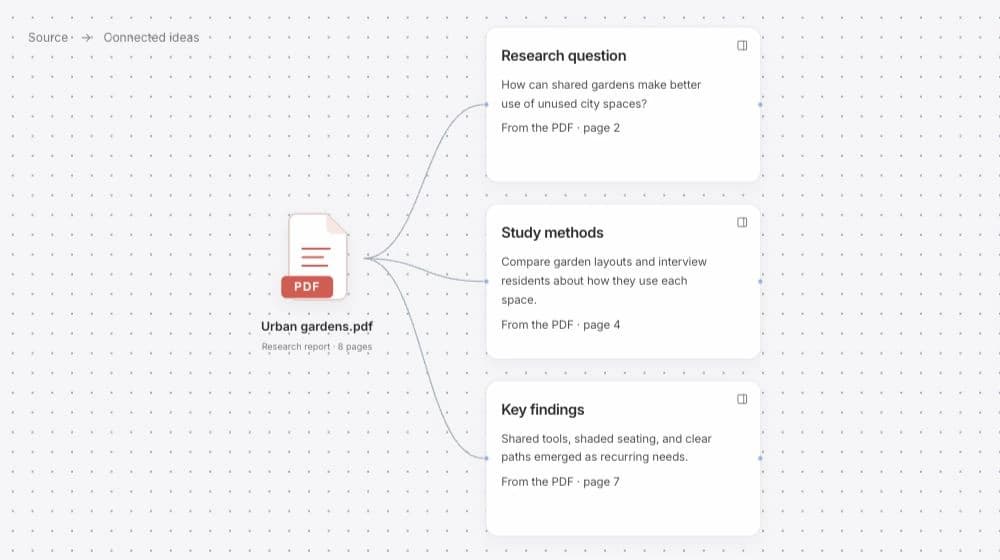
Upload a PDF containing text or scanned pages. The PDF to mind map workflow extracts the material for review and retains page references. A project brief, research paper, or report can then become a source for a focused session.
Think about what you need from the document before organizing it. You may want to understand the overall argument, compare a few recommendations, or collect questions for a meeting. The same document can support different maps depending on that purpose.
Choose the material and check its meaning
Read the extracted text and correct the details that matter. Names, numbers, headings, and passages from scanned pages deserve a closer look. Keep the original PDF available while you check a sentence that needs context.
Choose the pages or passages you want to use and describe the focus. A PDF to mind map converter is more useful when the selection matches your question. A short relevant section can be enough for a planning decision, while a broader review may need the document's main themes.
The review lets you separate the document's statements from the questions you bring to it. Keep those distinctions as you develop the map so your own interpretation remains easy to recognize.
Edit the map and follow page references
Generate a map from the reviewed material, then edit the notes and connections. Rearrange the branches, add an observation, or connect a finding to a question from your project. The source-page references help you return to the relevant passage while doing that work.
A document to mind map workflow can continue beyond summarizing the pages. Select a branch to explore an alternative, challenge an assumption, or write what you need to check next. Keep the original PDF and the reviewed extraction alongside that developing interpretation.
Example: compare two spaces described in a project brief
Imagine a short PDF describing two possible workshop spaces. One offers evening access; the other includes storage. A useful map could organize those details around the question “Which space fits this workshop?” rather than simply copying the document's headings.
This is a fictional example of how to use the material. In your own import, the notes retain the source references that let you check the actual wording behind the comparison.
A map organized around a decision
- Source material
- The passages describing access, storage, available equipment, and the remaining questions.
- Map branches
- What each space offers, which conditions matter, and what the organizer needs to confirm.
- Your contribution
- A note explaining how those conditions affect the workshop you are planning.