 noteboard
Start with the video you want to work through
Upload an MP4, WebM, or MOV file, or paste a public direct video-file download link. A recorded talk, interview, or tutorial can provide the spoken material for a video to mind map workflow. Review the transcription quote before processing the recording.
Think about what you want to do with the ideas. You might need the main themes from a talk, the questions raised in an interview, or the stages explained in a tutorial. That purpose helps you choose the relevant material once the transcript is ready.
Review what was said before organizing it
Read the transcript and check names, numbers, unfamiliar terms, and any sentence that needs the surrounding explanation. Edit the wording where necessary and keep the source timestamps with the material.
Choose the segment or passages you want to include and describe the focus. A video mind map generator can then organize the reviewed material around the main topics, supporting examples, or questions that matter to your project.
This workflow uses the spoken content in the reviewed transcript. Return to the video whenever the image, demonstration, or delivery provides context you want to add to your own notes.
Develop the notes and revisit the source
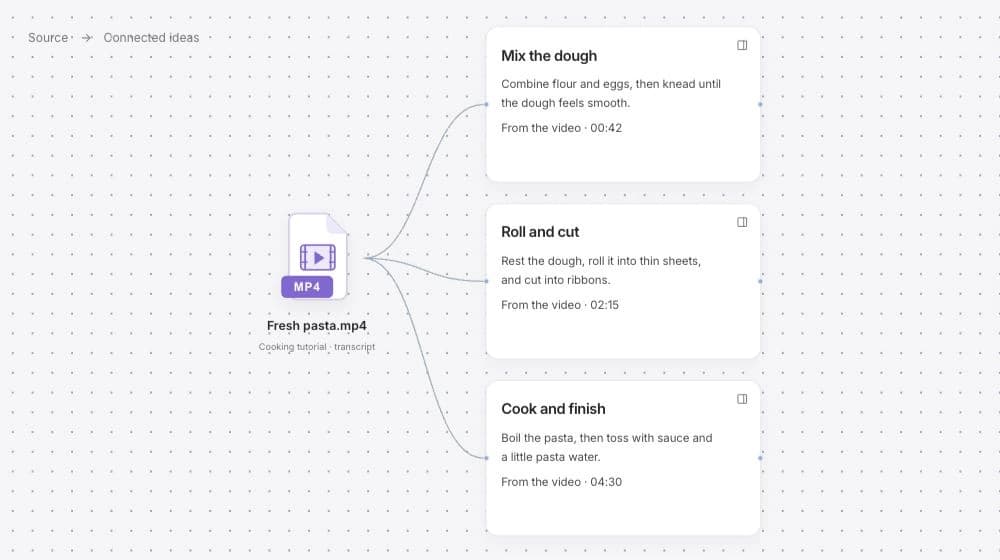
Generate connected notes from the reviewed transcript, then edit the structure. Give a branch a clearer title, add an observation, or connect an idea to a question from your project. Timestamped source references let you return to the part of the recording behind a note.
Keep the retained video and reviewed transcript together with the map. You can work on the ideas after watching, select a branch for another AI request, and revisit a particular moment when a detail needs a closer look.
Example: turn a recorded project discussion into review questions
Imagine a short recorded discussion about welcoming first-time workshop visitors. The speakers move between the arrival, the first activity, and the instructions they send in advance. A useful map can separate those themes and keep their source moments available.
This is an illustrative example of organizing a discussion. The resulting map gives you material to review; the team still checks the interpretation and decides which changes belong in its project.
A recording you can continue working with
- Themes
- Arrival, the first activity, and practical information before the session.
- Supporting detail
- The explanation or example a speaker gave, with a reference to the contributing moment.
- Your review question
- Which part of the visitor experience needs a clearer explanation in this project?